Run 3
Introduction
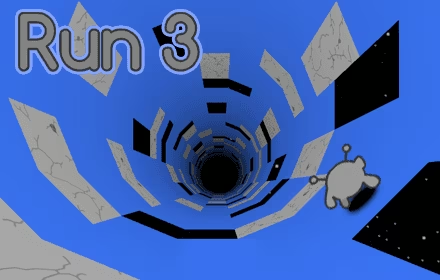
Run 3 is an addictive arcade running game that launches players into twisting space tunnels filled with gravity-defying challenges.
In this fast-paced space adventure, your primary objective in Run 3 is simple yet exhilarating: sprint across floating platforms and leap over dangerous gaps without falling into the void. As you push your limits through the cosmos in the Run 3 Game, you can tilt the world to shift gravity, unlocking fresh paths along the tunnel walls to bypass tricky hazards. In Run 3, players can guide the fearless Runner or unlock a roster of unique characters, each bringing special abilities that keep the action dynamic.
Whether navigating hidden routes across the Galaxy Map in Explore Mode or collecting power cells to survive the relentless trials of Infinite Mode, Run 3 delivers a thrilling platforming journey where precision and quick reflexes are essential.
How to Play Run 3
Mastering Run 3 requires quick reflexes, spatial awareness, and a firm grasp of the game's unique traversal mechanics. Your journey in Run 3 takes you through a perilous network of space tunnels floating in the void, where a single misstep can send you drifting off into deep space.
Core Objective
The primary goal in Run 3 is simple: run continuously across floating platforms and survive for as long as possible without falling off the edge. As you sprint through each tunnel, you must time your leaps across dangerous gaps and steer clear of tricky obstacles that threaten to disrupt your momentum. Falling into the void resets your attempt or costs your run, making precision your greatest asset throughout Run 3.
Controls and Gravity Mechanics
Navigating Run 3 and its dynamic three-dimensional tunnels relies on straightforward keyboard controls:
- Move Left / Right: Left and Right Arrow Keys
- Jump: Up Arrow Key
The defining feature of Run 3 is its gravity-shifting mechanic. By steering into the left or right walls with the arrow keys in Run 3, you tilt the entire world, reorienting gravity beneath your feet. In the Run 3 Game, this allows you to turn vertical walls or ceilings into brand-new running surfaces, opening up alternative routes when the path directly ahead is broken by gaping holes.
Choosing Your Mode
To tailor your experience, Run 3 offers two distinct game modes:
- Explore Mode: Journey across a vast Run 3 Galaxy Map where each completed tunnel unlocks new adventures. This mode encourages discovery as you chart paths through space, find hidden routes, and encounter friendly faces along the way.
- Infinite Mode: Put your endurance to the test in a relentless, non-stop survival run. While navigating these endless corridors in Run 3, keep an eye out for scattered power cells. Collecting these items allows you to boost your progress, revive yourself after a fatal plunge, or switch to other unlocked characters equipped with unique abilities to keep the action moving.
Tips & Strategies for Run 3
Navigating the perilous, floating platforms of deep space in Run 3 requires quick reflexes and smart decision-making. Whether you are charting the cosmos in Explore Mode or pushing for distance in Infinite Mode, use these actionable Run 3 tips and strategies to master the tunnels:
- Master the Gravity Shift: In Run 3, use the left and right arrow keys not just to steer, but to rotate the entire tunnel. When a path ahead is riddled with gaps or obstacles, steer toward the adjacent wall to shift gravity and land on a safer, uninterrupted surface.
- Look Ahead, Not Just at Your Character: Run 3 is fast-paced, and focusing solely on your runner will leave you unprepared for sudden drops. Keep your eyes fixed further down the tunnel to anticipate missing tiles, spot upcoming gaps, and plan your route several steps in advance.
- Time Your Jumps with Precision: Leaping across floating platforms using the Up Arrow key is essential for survival in Run 3. Learn the distance of your jumps so you can clear wide voids safely without overshooting onto dangerous territory or plummeting into the vacuum of space.
- Prioritize Power Cells in Infinite Mode: Keep an eye out for the glowing power cells scattered throughout Infinite Mode. Gathering these items gives you the vital resources needed to revive after a mistake or switch characters mid-run to extend your survival.
- Experiment with Unique Characters: While the default Runner is dependable, unlocking additional characters on the Run 3 roster grants access to unique special abilities. If a particular tunnel layout feels too challenging, swap characters to find an ability better suited to the terrain.
- Seek Out Hidden Routes in Explore Mode: Don't rush through the Galaxy Map on a single trajectory. Explore Mode contains alternative tunnels and secret routes that may offer easier paths forward or reveal fresh challenges and new levels.
FAQ about Run 3
What is the main objective of Run 3?
The goal of Run 3 is to navigate through twisting space tunnels and travel as far as you can without falling into the void. In the Run 3 Game, players must run nonstop across floating platforms, leap over hazardous gaps, and steer around obstacles to keep their run going.
How do the controls and gravity-shifting mechanics work in Run 3?
You control your character using standard keyboard inputs:
- Left and Right Arrow Keys: Move left or right, and tilt the tunnel walls to shift gravity and open up new running paths.
- Up Arrow Key: Jump over gaps and obstacles.
What is the difference between Explore Mode and Infinite Mode?
Run 3 features two distinct ways to play:
- Explore Mode: Allows you to progress through a Galaxy Map filled with interconnected tunnels, new levels, hidden paths, and friendly faces.
- Infinite Mode: A continuous endurance run that tests how long you can survive. This mode features scattered power cells that you can collect along the way.
What are power cells used for in Run 3?
In Run 3's Infinite Mode, you can pick up scattered power cells throughout the space tunnels. These cells can be used to revive your character after a fall or switch to other characters during your run.
Can you unlock other characters besides the default Runner in Run 3?
Yes. While you start your journey as the fearless Runner, you can unlock a roster of unique characters as you progress in Run 3. Each character comes with distinct abilities that change how you tackle the tunnels and floating platforms.
Where to play Run 3?
You can play Run 3 online at tube-fall.com. Open the site in your browser and start playing Run 3 right away.